LightBlog

mercredi 2 décembre 2020

Xbox November 2020 update brings dynamic backgrounds, Game Pass improvements and more

Microsoft has begun rolling out the November 2020 Xbox Console Update. The update is available for the newly launched Xbox Series X and Series S gaming consoles as well as the Xbox One family of devices. The new features that are coming with the update include dynamic backgrounds, new badges optimized for Xbox Series X and Series S, the ability to preload games from Xbox Game Pass, the ability to add existing Xbox family members to a new console, and some performance improvements and bug fixes.

Dynamic Backgrounds

xbox november 2020 update dynamic wallpapers

If your Xbox home screen looks dull, then the new dynamic backgrounds should add some new life. Available for the Xbox Series X and Series S, gamers will be able to customize their home screen with motion and color. There are six new options, including homages to older-gen Xbox consoles. Microsoft may or may not add more colors and themes depending on the feedback from users in the future.

Optimized for Series X and Series S badges

xbox november 2020 update oprimised for x|s badge

With the launch of the new Xbox Series X and Series S consoles, Microsoft did not launch any new or exclusive titles. It did, however, offer over 30 games fully optimized for the new-gen consoles and a bunch of older Xbox One games has also been updated to take advantage of the increased performance of the Series X and Series S. Microsoft has now added a special X|S badge to game tiles making it easier to see which of your games have been optimized. Users can also make use of the Filter button to see only “Optimized for Xbox Series X|S” games.

Auto HDR

xbox november 2020 update auto hdr

We already know that the new Xbox consoles have the ability to run HDR games. With the latest update, both the consoles will now include an option called Auto HDR. Turning this on would “improve the visual quality of a game without changing its overall look.” The best part is, this feature doesn’t require any additional work from the developer. There will also be a new tag to let you know if the game is benefiting from this feature. Users will be able to access this when they open the guide during a game with Auto HDR running.

Pre-load games on Xbox Game Pass

The latest update is also adding a new feature for Xbox Game Pass users. Apart from viewing and adding games to your “Play later’ list, users will be able to pre-install certain games before they arrive on Xbox Game Pass. You can check upcoming games and pre-install them by heading to the Xbox Game Pass app on your console or smartphone under the “Coming soon” section. Microsoft says that all upcoming games will not be available for pre-install, but there is a feature on the smartphone app that will let you queue them to install on day one.

Adding family member accounts

xbox november 2020 update family members

The Xbox Family Settings app for Android and iOS allows users to create and add family member accounts to their Xbox console, allowing them to have full control over their usage, notifications, stats, and more. The ones who have been using the app since its launch will now be able to add family members to their console during the setup.

Xbox Insider Program

Along with the new update, Microsoft has also announced the Xbox Insider Program for Xbox Series X and Series S users. You can read more about it and register yourself by heading here.

Apart from these, the new update brings some bug fixes and performance improvements. The new update is currently rolling out for all users of the Xbox Series X, Series S, and Xbox One consoles. If you haven’t got your hands on either of the new-gen consoles, then check out our restock guide for more information.

The post Xbox November 2020 update brings dynamic backgrounds, Game Pass improvements and more appeared first on xda-developers.


from xda-developers https://ift.tt/3mwP8sq
via IFTTT

Vivo V20 Pro with Snapdragon 765G and 44MP Dual Selfie cameras launched in India for ₹29,990

Vivo managed to beat the Google Pixel 5 to the podium, as it became the first OEM to launch a smartphone with Android 11 out of the box with the launch of the Vivo V20. The smartphone made its way to India too, and now, Vivo is bringing the Vivo V20 Pro to the country, a phone whose selfie prowess we have already witnessed in our selfie camera tests.

Vivo V20 Pro Selfie Camera Tests: Justified Marketing Hype!

Vivo V20 Pro: Specifications

Specification Vivo V20 Pro
Build
  • Metallic frame
  • Matte finish on the back
Dimensions & Weight
  • 7.39mm
  • 170g
Display
  • 6.44″ FHD+ AMOLED
  • 2400 x 1080
  • Centered notch
SoC  Qualcomm Snapdragon 765G:
  • 1x Kryo 475 (ARM Cortex-A76-based) Prime core @ 2.4GHz
  • 1x Kryo 475 (ARM Cortex-A76-based) Performance core @ 2.2GHz
  • 6x (ARM Cortex-A55-based) Efficiency cores @ 1.8GHz
  • 7nm EUV process

Adreno 620

RAM & Storage 8GB RAM + 128GB storage
Battery & Charging
  • 4000 mAh battery
  • 33W FlashCharge
Security In-display fingerprint scanner
Rear Camera(s)
  • Primary: 64MP, f/1.89
  • Secondary: 8MP, f/2.2, wide-angle, 120° FoV, 2.5cm macro
  • Tertiary: 2MP, f/2.4, monochrome
Front Camera(s)
  • Primary: 44MP, f/2.0, autofocus
  • Secondary: 8MP, f/2.28, wide-angle, 105° FoV
Port(s) USB Type-C
Audio
  • AI Noise Cancelling for Video Calls
Connectivity
  • 5G
Software Funtouch OS 11 based on Android 11
Other Features
  • Vapor Chamber Liquid Cooling

The highlight of the Vivo V20 Pro are three fold — it comes with the Qualcomm Snapdragon 765G SoC, which is one of the better SoCs around for a mix of performance and price; it claims to be the thinnest 5G smartphone in the segment; and it has a powerful front camera setup. This combination makes the device an ideal choice for users who focus on content creation with the front camera, which can range from influencers to other content creators who need a good front camera for their daily needs. The 44MP “Eye Autofocus” camera actually produces results that justify the marketing around it. In our testing, we found the Vivo V20 Pro to produce sharper, better lit, and better-balanced selfies than other competing phones such as the Galaxy Z Fold 2 and the iPhone 11 Pro. The front camera also enables features such as 4K video recording at 60fps, and slow-motion selfie videos.

The rest of the package is also decent. The Snapdragon 765G is a tried-and-tested formula at this stage, and the 6.44″ FHD+ AMOLED display should work well for most users. The rear camera also has good specifications, though one can always argue on the practical utility of 2MP auxiliary camera sensors. The battery is a decent 4000 mAh despite the thin profile of the phone, and the 33W FlashCharge fast charging can get you from 0-60% in 30 minutes.

Pricing and Availability

The Vivo V20 Pro will be available in India in Midnight Jazz and Sunset Melody colors, and in a single 8GB + 128GB configuration for ₹29,990 (~$407). The phone is already on sale across online stores such as Vivo’s website, Flipkart, Amazon.in, PayTM Mall, Tata Cliq, as well as offline stores such as Vivo Exclusive Stores, Croma, Reliance Digital, Vijay Sales, Poorvika, Sangeetha, and more. Customers can get ₹2,000 instant cash back on ICICI Bank Debit and Credit cards on online stores, and 10% cashback on ICICI Bank Debit and Credit cards and Bank of Baroda Credit Card on offline stores.

The post Vivo V20 Pro with Snapdragon 765G and 44MP Dual Selfie cameras launched in India for ₹29,990 appeared first on xda-developers.


from xda-developers https://ift.tt/39yzAB1
via IFTTT

mardi 1 décembre 2020

Here’s when your Samsung Galaxy phone may get the One UI 3.0 (Android 11) update

Android 11 is the newest version of Android. While the update has rolled out to a bunch of smartphones, phones that come with heavier UX skins need to wait for a longer time for the update to reach them. Samsung’s One UI 3.0 update is based on Android 11, and so far, the update has largely been restricted to flagship S series, Note series, and Fold series. If you are wondering when will your Samsung Galaxy smartphone get One UI 3.0 based on Android, here’s when it will receive its update.

Samsung has not publicly posted an update timeline for its Galaxy smartphones, but a list has been posted in the Samsung Members app for users in Egypt (via TizenHelp). This list may be talking about the update in the context of that region, but we can get a rough idea of the general timeline on when different phones will be getting their update. So far, Samsung has rolled out One UI 3.0 betas for the Galaxy S20 series, Galaxy Note 20 series, Galaxy S10 series, Galaxy Note 10 series, Galaxy Z Flip, and Galaxy Z Fold 2.

According to the list, here is the update timeline for stable releases:

  • December 2020:
    • Galaxy S20
    • Galaxy S20+
    • Galaxy S20 Ultra
  • January 2021:
    • Galaxy S10
    • Galaxy S10+
    • Galaxy S10 Lite
    • Galaxy Note 10
    • Galaxy Note 10+
    • Galaxy Note 20
    • Galaxy Note 20 Ultra
    • Galaxy Z Flip
    • Galaxy Z Fold 2
  • February 2021:
    • Galaxy Fold
  • March 2021:
    • Galaxy M21
    • Galaxy M30s
    • Galaxy M31
    • Galaxy A51
    • Galaxy Note 10 Lite
    • Galaxy Tab S7
  • April 2021:
    • Galaxy A50
    • Galaxy M51
  • May 2021:
    • Galaxy A21s
    • Galaxy A31
    • Galaxy A70
    • Galaxy A71
    • Galaxy A80
    • Galaxy Tab S6
    • Galaxy Tab S6 Lite
  • June 2021:
    • Galaxy A01-Core
    • Galaxy A01
    • Galaxy A11
    • Galaxy M11
    • Galaxy Tab A
  • July 2021:
    • Galaxy A30
    • Galaxy Tab S5e
  • August 2021:
    • Galaxy A10
    • Galaxy A10s
    • Galaxy A20
    • Galaxy A20s
    • Galaxy A30s
    • Galaxy Tab A 10.1
    • Galaxy Tab Active Pro
  • September 2021:
    • Galaxy Tab A8 (2019)

As is apparent, the update timeline mentioned within the Samsung Members app prioritizes the devices that already have a Beta update available in some form. The update lands on Samsung’s mid-range and budget range not before March 2021, which is a little disappointing. The update timeline also stretches all the way to September 2021, which is about a month before the next Android release is expected in stable form. Also, keep in mind that the wording used in the announcement on the Samsung Members app is “Preparing in …”, and not “Rolling out”, which leaves room open for any unexpected delays. While you wait for the update to arrive, check out the features that Samsung has in store for you, and the general update changelog.

The post Here’s when your Samsung Galaxy phone may get the One UI 3.0 (Android 11) update appeared first on xda-developers.


from xda-developers https://ift.tt/2JBZpVC
via IFTTT

Latest WhatsApp update brings advanced wallpaper features and improved sticker search

A few weeks ago, WhatsApp started testing a couple of new features in a recent beta release. These included a new option to mute videos before sharing, a Read Later feature to keep archived chats separate from the main conversation screen, and several advanced wallpaper customization options. With its latest update on the stable channel, WhatsApp has now started rolling out the advanced wallpaper customization options to some users.

As per a recent report from The Verge, the new wallpaper customization options include the ability to set different custom wallpapers for each chat, color variants of the original doodle wallpaper, several new nature and architecture wallpapers, and an option to set different wallpapers for light and dark mode.

Talking about the new wallpaper customization features, WhatsApp said:

“Make your chats personal and distinguishable by using a custom wallpaper for your most important chats and favorite people, and you never need worry about sending the wrong message in the wrong chat ever again.”

Along with the new wallpaper customization options, the latest WhatsApp update includes improvements for sticker search. Thanks to this, users will now be able to search for stickers with text or emoji and even browse through common stickers categories. To ensure that the sticker search feature works as intended, the Facebook-owned messenger has urged sticker creators to tag their stickers with emoji and text moving forward.

Finally, the World Health Organization’s “Together at Home” sticker pack is now available as animated stickers in the latest update. The sticker pack is available with text localized for 9 languages, including Arabic, French, German, Indonesian, Italian, Portuguese, Russian, Spanish, and Turkish.

According to Facebook, the latest WhatsApp update with all the aforementioned features is expected to reach both Android and iOS users this week. However, the update wasn’t available on any of our devices at the time of writing.

The post Latest WhatsApp update brings advanced wallpaper features and improved sticker search appeared first on xda-developers.


from xda-developers https://ift.tt/36ow9dW
via IFTTT

Lenovo Legion 5 with AMD Ryzen 5 4600U processor launched in India

Lenovo has introduced the Legion 5 gaming laptop in India. The company already sells the Gaming 3i, Legion 5i, and Legion 7i, all of which are powered by the 10th-gen Intel mobile processors. With the launch of the new model, Lenovo now has an AMD Ryzen-powered option for gamers. We recently featured this notebook as one of the best affordable gaming laptops that you could buy this year. As of now, Lenovo is only offering the base variant of the Legion 5 in India that includes the Ryzen 5 4600H processor.

The Legion 5 is priced at ₹75,990 ($1,030) although the price is listed as ₹79,990 ($1,080) on the official Lenovo India website for the Phantom Black color option. The notebook follows the same design language as we saw on the Legion 7i, but does not include the flashy RGB lighting. Lenovo is also offering a one-year free Premium Care and one-year of Accidental Damage Protection for the legion 5 at 3,900 ($53). You can get the laptop from Lenovo.com and Lenovo Exclusive Stores. Lenovo also promises that the laptop will be made available across other online partner platforms and retail stores, soon.

The gaming notebook features a 15.6-inch IPS anti-glare display having a Full-HD resolution (1920 x 1080 pixels) with a 120Hz refresh rate. As mentioned above, it is powered by the AMD Ryzen 5 4600H processor which is a six-core processor with 12-threads and a clock speed of 3GHz with a max boost speed of up to 4GHz. There is 8GB of DDR4 RAM clocked at 3200MHz and for graphics, it features the NVIDIA GeForce GTX 1650 Ti having 4GB of GDDR6 memory. For storage, you get a 256GB M.2 PCIe 3.0×4 NVMe SSD as well as a 1TB HDD. As for ports and connectivity you get four USB 3.2 Gen 1 Type-A ports, one USB 3.2 Gen 1 Type-C port, an Ethernet (RJ-45), and a headphone/microphone combo jack. The notebook also comes with standard Wi-Fi 6 and Bluetooth 5.0.

Lenovo says that the notebook will offer a battery life of 8 hours with its ‘Hybrid Mode.’ Considering the AMD chipset is based on the 7nm node, we don’t believe that the results would be far from the claims. You also get Lenovo’s TrueStrike keyboard with white backlit keys along with Rapid Charge Pro for fast battery charging. The 720p webcam comes with a shutter slider that lets you shut the camera lens for extra privacy.

The post Lenovo Legion 5 with AMD Ryzen 5 4600U processor launched in India appeared first on xda-developers.


from xda-developers https://ift.tt/3lxVff2
via IFTTT

These are the Best Android Phones to buy in 2020

As 2020 comes to a close — thank God! — we have a more finalized idea of the entire Android landscape for this year. And it’s been a good one, with slab phones arguably reaching an apex in fluidity and screen-to-body ratio, while brands also pushed out adventurous new form factors that bend or swivel.

No matter if you have $1,400 to spend or $600, there is a very capable Android phone that will meet all your professional and personal needs. We here at XDA have the privilege of testing just about every new release, and here are the best Android phones you can buy right now:

Navigate this guide:

Best Android Phone Overall: Samsung Galaxy Note 20 Ultra

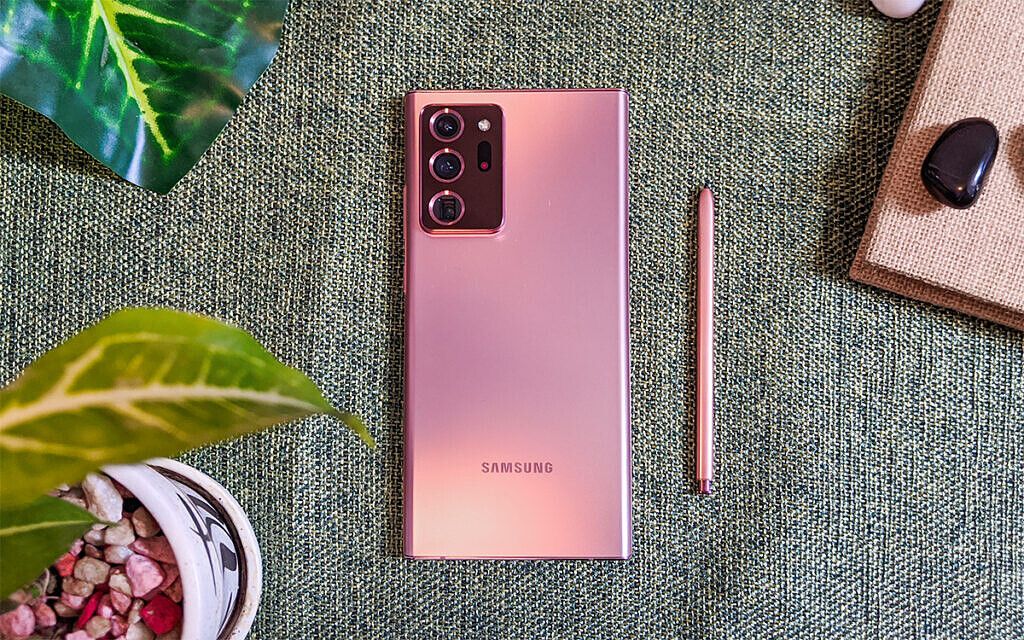
Best Android Phone – Galaxy Note 20 Ultra

There were several worthy contenders for this spot. However, the Galaxy Note 20 Ultra edges out some tough competition – don’t worry, we still honored them on this list in other categories – by checking more boxes. The most powerful Android chipset around? Check (if you’re buying the Snapdragon 865+ version, that is). Capable cameras that let you zoom in far or take a step back and go ultra-wide? Check. Premium, unique design, and the best screen possible? Check and check! Heck, the Note 20 Ultra even throws in a stylus to boot, which offers even more functionality most smartphones can’t claim.

Sure, we can nitpick if we want — the zoom cameras here aren’t quite at the Huawei P40 Pro+’s level; it charges much slower than the Xiaomi Mi Ultra, the boxy corners make the phone less comfortable to hold for some hands — but ultimately, no phone this year packs as much in one package with no noticeable glaring flaws.

    Samsung Galaxy Note 20 Ultra
    If you're looking for the most capable and feature-packed smartphone and not quite ready to jump to the cutting-edge foldable category yet, then look no further than the Note 20 Ultra. It has everything you'd need out of a smartphone, including a stylus!

Best Android Phone for most people: Samsung Galaxy S20 FE


Best Android Phone – Samsung Galaxy S20 FE

While the Note 20 Ultra is, in our opinion, the best slab smartphone money can buy, the just-announced S20 FE is likely the phone for most people as it still gives you much of what makes a Samsung flagship great. This includes that 120Hz Super AMOLED display, a responsive and well-thought-out UI, and well-performing cameras — except the S20 FE is half the price of the Note 20 Ultra.

You’ll have to make do with a plastic body and just Snapdragon 865 instead of the 865+, but these are concessions we think most would take to save $600-$700.

    Samsung Galaxy S20 FE
    If you're a fan of Samsung's flagships but have found the four-digit prices hard to stomach, the Galaxy S20 FE is for you. Compromises are far and few between in this sleek and powerful mid-ranger with a 120Hz Super AMOLED screen!

Best Samsung Galaxy Phones for every budget and need (updated December 2020)

Best Android Phone for software and speed: OnePlus 8 Pro

Best Android Phone – OnePlus 8 Pro

OnePlus is a brand that’s always been all about speed, and the 8 Pro is once again the fastest phone on the market. Everything – from the way apps launch at rocket speed to how the notification panel whips up and down along with your finger swipes – in the UI here has been optimized for speed. The effect looks extra fluid this year thanks to a 120Hz panel too.

When it comes to OnePlus’ UI, OxygenOS, it’s not just about speed: it’s also, in my opinion, the best Android skin around, with plenty of customization and shortcut gestures galore. Want to use multiple different icon packs on one home screen? Or change the accent color scheme of your app drawer? Or hide apps in plain sight with a simple swipe? OxygenOS offers more ways to use Android, even more so than Google’s stock UI.

The rest of the hardware is top-notch, too, although the phone looks a bit boring due to the recycled back design. For the first time in a OnePlus phone, the 8 Pro gets wireless charging and IP68 water resistance. These new additions go well with the improved camera system and the beloved alert slider hardware button.

    OnePlus 8 Pro
    OnePlus phones have always been able to go toe-to-toe with the big boys in terms of overall performance, and this year's 8 Pro is no exception. A large 120Hz AMOLED screen, Snapdragon 865, and a 48MP ultra-wide-angle camera provide more details than the less pixel-dense ultra-wides seen in many rivals. But ultimately, what sets the 8 Pro apart is its unrivaled speed and clean yet fully customizable UI.

Best point and shoot camera phone: Google Pixel 5

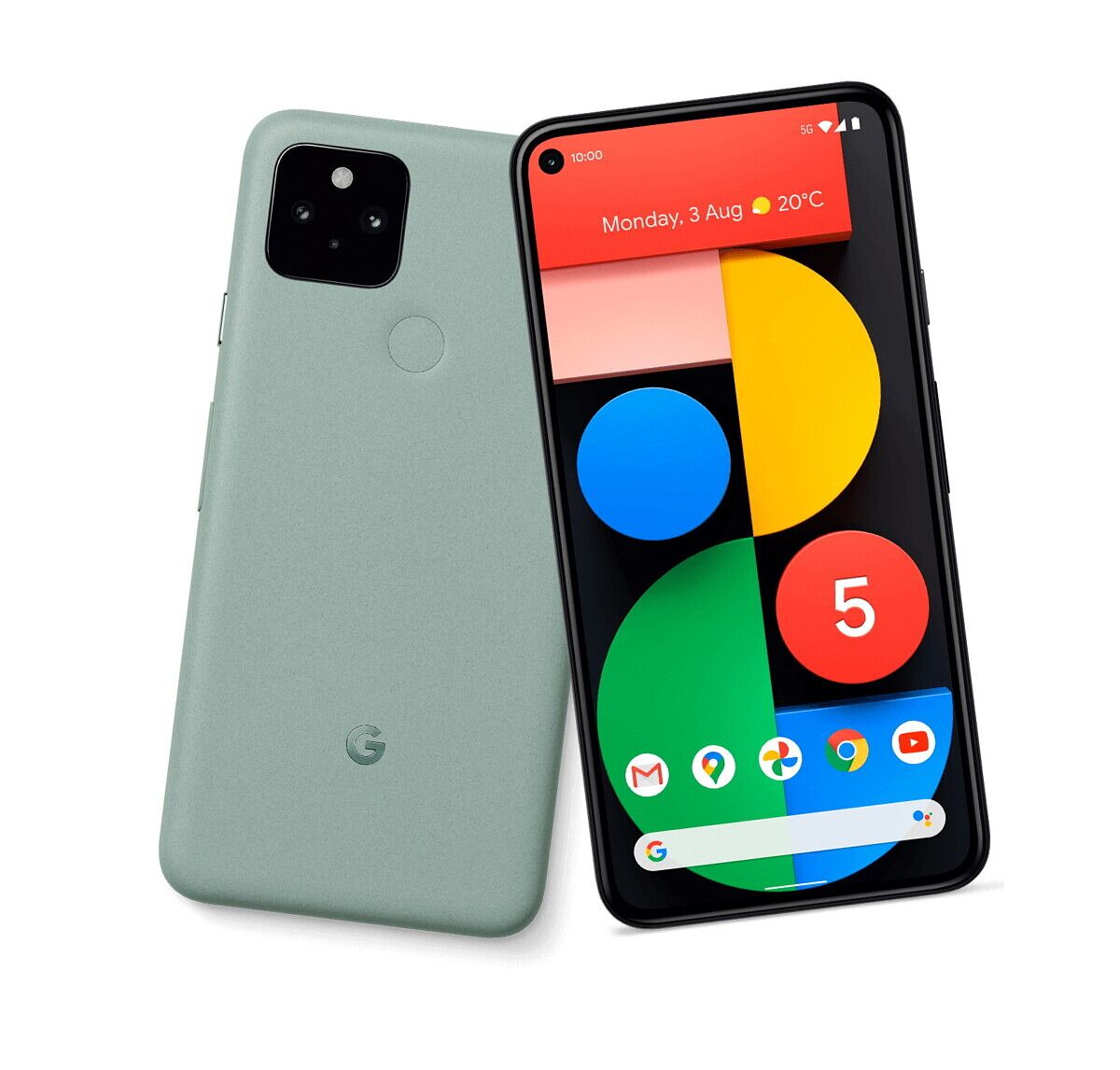
Best Android Phone – Google Pixel 5

Google’s Pixel series, even back when it was aspiring to be a premium flagship, never really fully got hardware right. Whether it was the original Pixel’s outdated bezels, Pixel 2 XL‘s display problems, Pixel 3 XL‘s giant, unsightly notch, or the Pixel 4’s mediocre battery life and wonky facial recognition system, every generation of Pixel has had a glaring hardware flaw. But despite that, many reviewers and tech enthusiasts still gladly carried a Pixel over the years, because Google’s camera software processing was that good.

And that camera prowess is why the Pixel 5 cracks this list, despite a spec sheet and hardware craftsmanship that sits a tier or two below other brands’ offerings listed here. But with the Pixel 5, you know you’re getting color science that is always on point, dynamic range perfectly balanced, and the best portrait/bokeh mode around.

And for the first time, we even get an ultra-wide-angle camera in a Pixel. Throw in the usual Pixel perks like the purest version of Android and specific Pixel features, and the Pixel 5 is an easy recommendation.

    Google Pixel 5
    Google's newest brings several new features, but the most important is that Pixel camera with its glorious image processing and dynamic range is back. If you just want to point, tap the shutter button, and expect a great shot, look no further.

Best Cheap Android Phone: Google Pixel 4a

Best Android Phone – Google Pixel 4a

If you want that Pixel 5 primary camera performance but want to save a bit, the Pixel 4a (not to be confused by the larger and more expensive Pixel 4a 5G) is one of the cheapest options on this list.

You lose out on the ultra-wide-angle camera and 5G connectivity, but you still have virtually the same primary camera as the Pixel 5. If it’s just standard 1x point-and-shoot photos, the Pixel series is hard to beat. If you want to see other choices on a budget, check out our guide to the best cheap android phones!

    Google Pixel 4a
    The Google Pixel 4a brings virtually the same main camera as the Google Pixel 5, which means it's got one of the very best cameras on the market. Everything else about the phone is solid if unspectacular -- but when at this price, and with a camera performance this next level, it's hard to complain.

Best overall camera phone: Huawei P40 Pro+

Best Android Phone – Huawei P40 Pro Plus

While the Google Pixel 4a’s primary camera is arguably the king due to its color science, dynamic range, and unbeatable portrait mode, the Huawei P40 Pro+ is inarguably the most capable and versatile camera system of the year. Let’s start with the Periscope zoom lens. Other phones like the Galaxy Note 20 Ultra, Oppo Find X2 Pro, or Xiaomi Mi 10 Ultra offer a 5x optical zoom camera — Huawei’s P40 Pro+ doubles that with a 10x, thanks to a couple of extra folds and lenses inside the Periscope hardware. Other ultra-wide-angle cameras see a significant performance drop off at night? Not the P40 Pro+’s ultra-wide, which uses the same RYYB sensor tech Huawei first introduced with the P30 series that allows it to virtually see in the dark. Throw in another short telephoto lens to cover portraits, and the P40 Pro+’s cameras are a few steps ahead of the rest. That primary 50MP main camera is excellent too — it can still pull in light in pitch black scenes better than any camera — though it tends to over-process and over-sharpen, hence why we gave the edge to the Pixel 4a.

Unfortunately, the P40 Pro+ cannot run core Google Mobile Services apps due to the ongoing sanctions placed by the US government, so be sure you weigh the pros and cons before considering one.

    Huawei P40 Pro+
    With a 10x optical zoom camera and an 40MP ultra-wide-angle camera, the Huawei P40 Pro+ has the most versatile and capable cameras on the market. The rest of the package is pretty premium too -- unfortunately, there's the Google ban issue to consider.

Best Android phone for Gaming: Asus ROG Phone 3

Best Android Phone – ASUS ROG Phone 3

If you’re into mobile gaming, then look no further than the Asus ROG Phone 3, which we named “the king of gaming smartphones” in our review. So what makes this a gaming beast? Let’s start with the 144Hz display, which the handset can maintain without micro-stutters. Throw in a massive 6,000 mAh battery to handle that refresh rate without sacrificing battery life. Then add functional shoulder buttons named “AirTriggers” that give extra control to first-person shooters in ways most normal smartphones cannot, and a bunch of optional accessories that add further controls, and you have the most equipped smartphone to handle gaming at a high level.

Of course, when you’re done gaming, the ROG Phone 3 works fine as a regular smartphone too, with a reliable camera system, Snapdragon 865+, and 16GB of RAM, no app will bog this thing down.

    Asus ROG Phone 3
    A stunning 144Hz display, 6,000 mAh battery, Snapdragon 865+, 16GB of RAM and AirTrigger shoulder buttons make this the best phone for playing games.

Best Android foldable phone: Samsung Galaxy Z Fold 2

Best Android Phone – Samsung Galaxy Z Fold 2

This is a landslide win for the Fold 2 in this category, considering the only other real option is the Huawei Mate XS, which is pricier, not on sale officially in the US, can’t run core Google apps, and has a folding-screen-on-the-outside design that looks stunning but raises serious durability concerns. The Fold 2, meanwhile, is widely available, has no software restrictions, and has a firmer folding screen made of “ultra-thin glass” that is protected when not in use.

The device feels the most polished and refined of all foldable phones released so far and has won the hearts of several of us here at XDA already. Other than water-resistance and perhaps a thinner build (neither of which are realistic requests at this time as the technology isn’t there yet), there’s not much you can fault the Fold 2 for.

    Galaxy Z Fold 2
    The most cutting edge phone of the year -- but it will cost you a pretty penny. However, if money is no object and you need to have the very best that Samsung offers, look no further than the Galaxy Z Fold 2. We love it, and so will you!

Best Android phone not sold in the US: Xiaomi Mi 10 Ultra

Best Android Phone – Xiaomi Mi 10 Ultra

The Xiaomi Mi 10 Ultra is the Chinese tech company’s 10th-anniversary commemorative device, but it should be named the Mi 120 because there’s a trio of 120-themed features that make this phone great. It has a 120Hz OLED panel, 120x max digital zoom, and 120W charging speeds. The latter is insanely fast: in our testing, the Mi 10 Ultra can go from 0 to 100 in 23 minutes, or if you’re topping up in the peak charging speed range of between 30 and 80%, expect a five-minute charge to add nearly 24% of juice.

Throw in 55W fast charging (you need Xiaomi’s specific charger to achieve this speed), a Snapdragon 865, unique clear transparent glass back, a versatile quad-camera system, and a very reasonable sub-$800 price, this is a device worth celebrating. It’s worth noting this phone only has a China version, so you’ll have to sideload Google yourself.

    Xiaomi MI 10 Ultra
    A China-only phone with a long list of specs headlined by a 120x zoom, 120W fast charging and 120Hz screen, the Mi 10 Ultra is a powerhouse that doesn't break the bank.

Best Android phone not sold in the US, runner up: Oppo Find X2 Pro

Best Android Phone – OPPO Find X2 Pro
The original Oppo Find X, released in 2018, was a quirky and unconventional smartphone with all of its cameras hidden in an elevating module. While it was a looker, the phone was a bit awkward to use. With the Find X2 Pro, Oppo’s gone a more conventional route, but in return, crafted one of the most well-rounded and polished smartphones of the year.

With a Snapdragon 865, 120Hz OLED display, a Periscope zoom lens that can achieve 5x optical zoom, 10x hybrid zoom, and maximum 60x zoom, the Find X2 Pro has all the specs needed to compete with the best of the best — and if we were compiling this list in mid-2020, this might have well taken the top spot. But in the months since the Find X2 Pro’s 65W fast charging has been surpassed by the Mi 10 Ultra’s 120W, and the display here, while gorgeous, falls a tad short of the new heights set by the Note 20 Ultra (it’s brighter and has a variable refresh rate).

The camera system here is good enough to fill every need, with the 48MP ultra-wide-angle camera producing noticeably sharper images than the ultra-wide-angle cameras of Samsung’s or Xiaomi’s phones. We are also huge fans of the orange leather back, which adds an extra touch of character.

    Oppo Find X2 Pro
    A polished and refined flagship that shows Oppo's prowess in both hardware and software, the Find X2 Pro was arguably the best Android in the first half of 2020, but alas, other releases have edged it in performance and screen brilliance.

Best for multi-tasking: LG Wing, Microsoft Duo

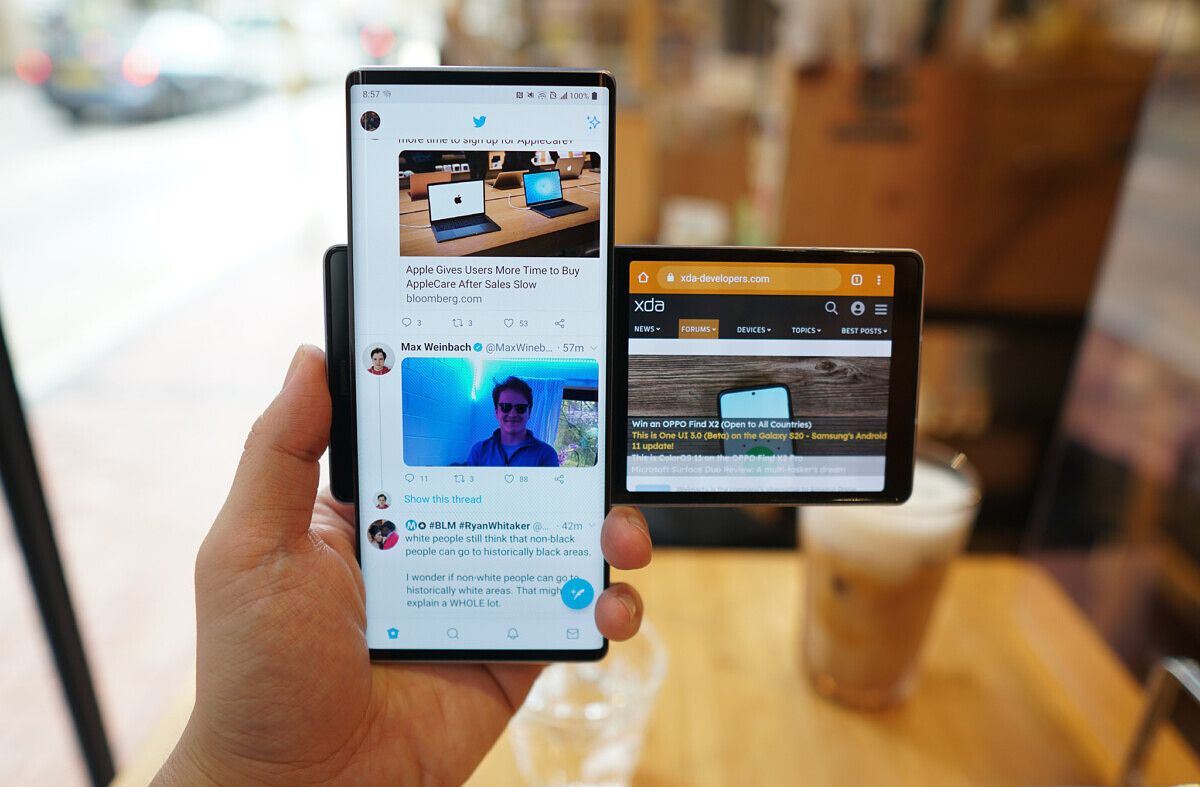
If productivity is paramount, then two screens is obviously better than one. The LG Wing and Microsoft Duo take very different approaches to this dual-screen set-up. The Wing, in “normal mode,” resembles any other slab smartphone — it’s big, tall, curvy, with almost all-screen on its face. But give the bottom left side of the screen a little push and the front screen swivels, revealing a second screen in the back plate.

The Microsoft Duo, meanwhile, is more like two screens connected together by a very premium hinge. The Duo folds and opens like a book, and unlike the Wing, both screens are the same size.

Neither phone carry the most powerful SoC or best cameras, but these are productivity machines first and foremost. To be able to run, say, Slack on one screen while a word document or an email on the other is something most of us remote workers would enjoy.

    Microsoft Duo
    The Microsoft Duo is an amazingly thin dual-screen device that opens and close like a book. While there were some software quirks at launch, Microsoft has fixed enough of it that the device is usable. If you need to run two apps at the same time often, this is one of the best options.


The post These are the Best Android Phones to buy in 2020 appeared first on xda-developers.


from xda-developers https://ift.tt/3laOeRA
via IFTTT

Instagram Live Rooms allows creators to add 3 users to a Live session

Instagram has become the de-facto platform for influencers and content creators, thanks to its tighter focus on photo and video sharing as a service. But COVID has changed how we create and consume content, with focus now turning towards shared Live experiences and interactions. Video calls are now the norm for personal calling, and multi-person virtual conferences the norm for events. Instagram is consequently adapting its Live strategy, as it is now allowing creators to add up to three additional people in Live Sessions through Live Rooms.

Instagram’s newest feature is called Live Rooms. Simply put, it is an extension of the existing Live functionality, with the flexibility of adding two more people in the session than previously allowed. Live sessions can now feature four people in the same window, allowing for greater flexibility in the topics that can be explored in these sessions. Previously, a Live session could hold only the creator and one additional guest — and if you need to add anyone else, you would need to remove the guest previously added.

Live Rooms was tested with a few creators in India, and the multi-participant video chat format received praise from them. Rollout for Live Rooms has begun and will soon be available to everyone in India and Indonesia. Instagram did not mention if and when this feature will be rolled out to the rest of the world, but we reckon global rollout will follow soon as well, as it did for features like Vanishing Mode and BTS Theme.

How to use Instagram Live Rooms

To go live on Instagram:

  • Tap the plus sign in top left hand corner of your stories tray or click the “Create” plus icon in the top right of home navigation bar
    • Note: you can also swipe left when you’re on your main Instagram home screen!
  • Scroll to and tap the Live camera option at the bottom
  • Use the menu on the left to add a title if you so choose
  • Tap the circular button to go live

To add guests to your live stream:

  • While you’re already live, tap the Camera/Rooms icon
  • Now, you’ll see people that have requested to join your live. You can also search for your guest’s name to send them a request to join your live.
  • Simply tap on the guest’s handle to add them
  • You can add all three guests at one time, and you can also add guests at a later time

Instagram (Free+, Google Play) →

The post Instagram Live Rooms allows creators to add 3 users to a Live session appeared first on xda-developers.


from xda-developers https://ift.tt/39scqMB
via IFTTT